For Apple Silicon Macs · macOS 14+

Your Mac finally games.

IgniteX runs the Windows games in your Steam library on Apple Silicon — no Windows, no dual-boot, no fiddling. Install, sign in, play.

One-time purchase · Use on 2 Macs · 14-day money-back guarantee

How it works

Three steps. No terminal, no tweaking.

IgniteX ships its own self-contained Windows compatibility engine. You never see a config file — it looks and feels like any other Mac app.

Install IgniteX

Drag the app into Applications and open it. IgniteX prepares its gaming environment and fetches the Steam client for you — one click, about 600 MB, a few minutes.

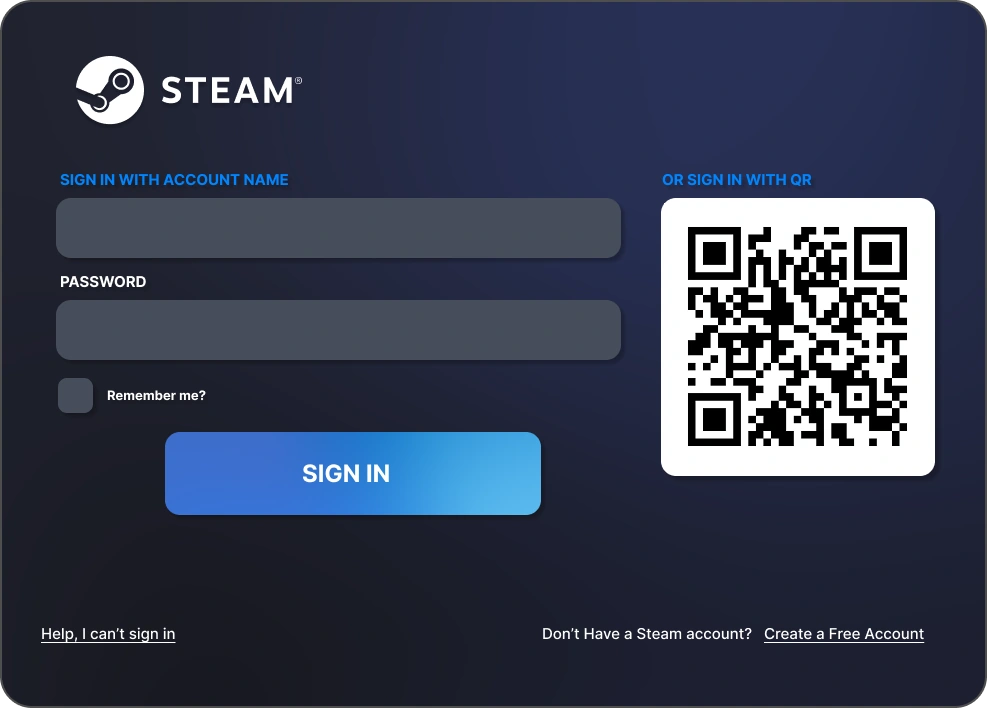
Sign in to Steam

The familiar Steam login window appears. Enter your account name, password, and Steam Guard code — exactly as on any other computer. Your library is right there.

Press Play

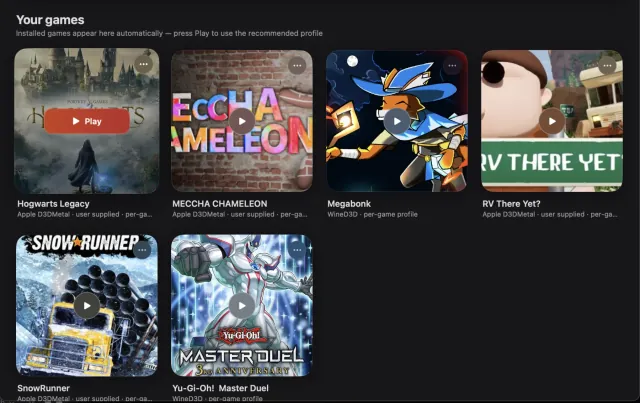
Pick a game, install it, hit Play. Direct3D graphics are translated straight to Metal by the open-source DXMT layer — the full power of your M-series chip, no virtual machine in the way.

Game compatibility

Play your backlog.

IgniteX is built for the single-player and co-op games sitting in your library — DirectX 11 titles are the sweet spot. We assessed 777 games: 465 on the green list, 213 maybe, 99 won't run.

✓ Verified by hand

MECCHA CHAMELEON

Installed from Steam, launched, and played end-to-end on an M-series Mac — including online and Workshop mods.

✓ Verified by hand

Counter-Strike 2

Installed and played on an M-series Mac on the exact engine IgniteX ships — VAC online included. Free to play: try it as your first game.

A sample of the 465-title green list:

  • Counter-Strike 2
  • The Witcher 3: Wild Hunt
  • Persona 5 Royal
  • Persona 4 Golden
  • Hades
  • Hades II
  • Hollow Knight: Silksong
  • Skyrim Special Edition
  • Fallout 4
  • Fallout: New Vegas
  • Yakuza 0
  • Yakuza: Like a Dragon
  • NieR:Automata
  • Monster Hunter Rise
  • Resident Evil 7
  • Dark Souls II
  • Alien: Isolation
  • BioShock Infinite
  • DOOM (2016)
  • Batman: Arkham Knight
  • GTA V (story mode)
  • Borderlands 2
  • Dragon Quest XI S
  • Civilization VI
  • Crusader Kings III
  • Cities: Skylines
  • Disco Elysium
  • Portal 2
  • Cuphead
  • Celeste
  • Stardew Valley
  • Terraria
  • Slay the Spire
  • Balatro
  • Vampire Survivors

Honesty first: green-list verdicts are predictions from our compatibility rules (anti-cheat → DirectX version → engine), not guarantees. Titles marked ✓ above were tested by hand; the list grows as the community reports results. If your game doesn't run, the 14-day refund applies — no questions asked.

Browse the full 777-game catalog →

Before you buy

What works — and what honestly doesn't.

No compatibility layer runs everything, and we won't pretend otherwise. Here is the real picture.

Great on IgniteX

Single-player and co-op games without kernel anti-cheat, especially DirectX 9/11 titles.

  • Story-driven AAAWitcher 3, Skyrim, Sekiro
  • JRPGsPersona, Yakuza, Dragon Quest
  • Strategy & simsCiv VI, CK3, Cities: Skylines
  • Soulslikes (solo)Dark Souls II, Lies of P
  • IndiesHades, Balatro, Silksong
  • Steam Workshop modssupported

Doesn't work — and won't

Competitive shooters with kernel-level anti-cheat need a Windows kernel driver. No Mac compatibility layer can run them — not IgniteX, not anyone else.

  • Valorant, League of LegendsVanguard
  • Fortnite, Apex LegendsEAC
  • Call of Duty / WarzoneRicochet
  • Battlefield 6, EA FCEA Javelin
  • PUBG, Destiny 2, R6 SiegeBattlEye
  • Overwatch 2, Rust, Robloxalways-online AC

Also worth knowing: DirectX 12-only blockbusters are hit-or-miss — some don't run at all (Alan Wake 2), others run with reduced performance (Cyberpunk 2077). Elden Ring sits on our "maybe" list: anti-cheat blocks online play. Check your games in the full catalog before buying — that's what it's for.

FAQ

Questions, answered straight.

The five things everyone asks first.

Which games work?

DirectX 11 titles from your Steam library are the sweet spot — we maintain a public catalog of 777 assessed games and keep expanding it. Games with kernel-level anti-cheat (most competitive multiplayer shooters) do not work locally, on IgniteX or any other compatibility layer. Check your games in the catalog before you buy.

Do I need a Windows license?

No. IgniteX doesn't use Windows at all — games run through an open-source translation layer directly on macOS, with graphics rendered natively via Metal.

Is this legal?

Yes. You play games you own, on your own Steam account. The Steam client is downloaded directly from Valve during setup and used under the Steam Subscriber Agreement. IgniteX is built on open-source technology (Wine, DXMT, MoltenVK) and is an independent product, not affiliated with Valve.

What Mac do I need?

Any Apple Silicon Mac (M1 or newer) running macOS 14 Sonoma or later. Plan for about 3 GB of disk space for IgniteX plus Steam, plus whatever games you install.

One honest note: compatibility isn't the same as performance. A base M1 with 8 GB won't push a demanding AAA title the way an M4 Pro will — check the game's own system requirements and be realistic about your hardware. That part we can't promise for you. 🙂

What if my game doesn't run?

You get your money back — 14-day refund, no questions asked. To avoid disappointment in the first place, check the verified-games catalog before purchase.

Pricing

Less than the games you'll finally play.

One price. Pay once, own it.

$5

€4.99 · 119 Kč

One-time purchase. No subscription.

  • Full app with self-contained game engine
  • License key for up to 2 Macs
  • Activate once online — then play offline
  • 14-day money-back guarantee
  • Instant delivery by email
Get IgniteX — $5

Secure checkout and VAT handled by Lemon Squeezy (merchant of record). Requires an Apple Silicon Mac with macOS 14 or later.